
Skip To Content
hamburger
hamburger
Agentic Molding Toolkit

Injection molding simulation your AI can run for you

Give your AI a goal. It sets up the filling simulations, runs them on SIMCON's Cadmould physics, and comes back with a recommendation. The engineers get the final say.

One subscription, up to three people · Monthly, cancel any time · First example needs no account

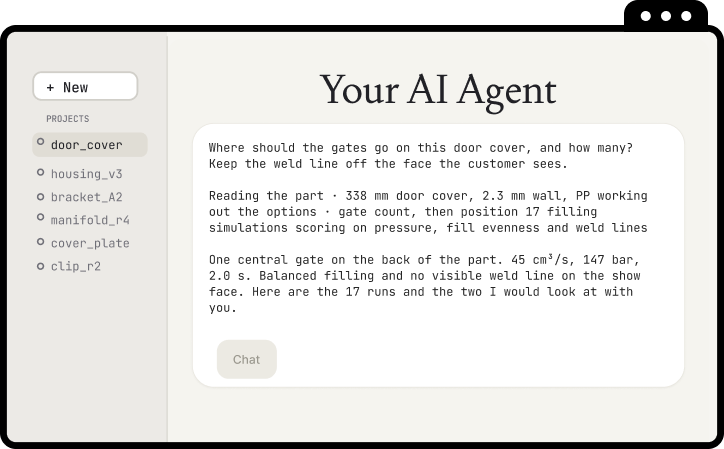
AI agent conversation recommending a gate position for a door cover
  • Faster decisions

    A gate question gets answered while the meeting is still running. Up to 1,000x faster than classical solvers, for filling analysis.

  • Explore before it is expensive

    Explore a hundred layouts while the design can still change. The limit is what you think to try.

  • Answers you can defend

    Confirm the results on the numerical solver, validated for more than 35 years. Under 5% error on most filling cases.

  • No AI experience needed

    Your engineers set the goal and judge the result. The agent does the setup and the runs in between.

What an answer looks like

A real result, from a real part

This is the finished result from the conversation at the top of the page. The agent ran 17 filling simulations and recommended this gate position. Drag it to turn it, switch between filling pressure, melt temperature and how full it is, and play the fill from the gate.

Browser view of a finished filling result

What an agent is

An AI agent is a chatbot with permission to act

You have used a chatbot: it tells you what you could do, and then you go and do it yourself. An agent reads the files in a folder you point it at, writes new ones, and runs them. It comes back to you with what it found.

A chatbot

  • Describes what you could do
  • You copy things out and run them
  • Forgets between conversations
  • One answer at a time

An agent

  • Does it, then shows you
  • It runs them and reads the result
  • Reads your notes every session
  • Hundreds of runs while you do something else

How a question becomes an answer

  1. You describe the decision

    • In plain language, the way you would brief a colleague.
    • Which part, what has to hold, what you are willing to trade away.
  2. It runs the simulations

    • It works out the candidates, runs them, reads the results and scores them against what you said mattered.
    • Hundreds of runs is a normal afternoon.
  3. You judge the answer

    • The recommendation arrives with the runs behind it, so you can check the reasoning and say yes or no.
    • That judgement stays yours.

Your week

Four questions you already deal with, and the sentence to type for each

Having the tool is not the same as using it, and this is the part that usually gets skipped. Here are four, with the actual words. Each one is a single sentence. Copy one and start there.

A result lands on your desk Work out what a result is actually telling you

A finished simulation, and the question is where the trouble is. Start here, because you can check the answer yourself in a minute.

Type this

Open the result in this folder. Tell me which region fills last and what the peak cavity pressure is, and show me the output you based that on.

It only reads and reports. Nothing is changed, and you already know what a plausible answer looks like.

A new part arrives Put your own part through, without booking a specialist

The geometry is in your hands and you want a first read today rather than next week.

Type this

Take the part file in this folder, run a filling simulation on the grade we normally use, and tell me the peak cavity pressure and where it fills last.

One run, seconds of solver time, on your own account.

Before the design review Settle how many gates, and where

The question everyone has an opinion about. Answer it with a scored table instead of experience alone.

Type this

Try one to four gates on this part and rank the layouts on filling pressure and fill evenness. Keep the weld line off the face the customer sees, and tell me why each one scored where it did.

Every candidate comes back with the run behind it, so the recommendation is arguable in the room.

The machine trial is booked Walk in with real bounds instead of a best guess

You want the window the part still fills in, and to know which limit bites first.

Type this

Sweep the process settings on this part and give me the range where it still fills. Tell me which limit we hit first, and write it up as a short spec I can take to the trial.

A sweep of this size finished in about 86 minutes in our own run, and it can be picked up again if it stops.

The awkward questions, answered plainly

What IT will ask you, and what to tell them

Engineers are trained not to trust a tool whose limits they cannot state. So here are the three questions that come up every time, in language you can repeat in a meeting.

Where does our data go?

The files the agent reads are sent to the model vendor to answer the request. Sent is not the same as trained on. Business and enterprise plans exclude your content from training by default, and the vendor states how long it is kept. Check which plan you are on.

Your geometry and your results stay on your machine unless the agent uploads them to the platform, and it does that over your own account.

Can it delete or change things?

It can write files in the folder you start it in, and nowhere else. Start in a fresh, empty project folder, keep it off network drives, and approve each command one at a time until you trust the pattern.

You approve every step. Nothing runs behind your back.

What does it need installed?

Tell us which AI agent your team uses and we will tell you how we can work with it.

It needs Python and an outbound network connection. Nobody on your team has to open Python: it is what the agent runs on. It installs like any other desktop tool, with no admin rights beyond what Python already needs. There are two logins, one for the platform and one for the toolkit itself, and both are set up for you the first time.

Checking the work

How you know the answer is right

The agent can check the mechanical things: whether a run finished, or whether one option came out better than another on a measure you set.

You check the rest: whether it was the right measure, whether it used the right revision of the part, and whether the result is physically plausible. That judgment is most of the skill, and it stays with you.

AI agent conversation recommending a gate position

What it covers today

Fast answers to iterate on, and more than 35 years of numerical physics to confirm them

Two engines, one platform, one way of working. Explore with the AI Solver, confirm on the Cadmould numerical solver before anyone cuts steel. Here is the honest scope, so nothing surprises you later.

What the AI Solver covers today, compared with the numerical solver

hundreds of filling variants at once

The AI Solver

  • Filling, thermoplastics
  • Up to 1,000x faster than classical solvers
  • Full 3D fill results in seconds
  • Under 5% error on most filling cases
  • On the roadmap: runner systems, cooling systems, warpage
full-fidelity verification

Numerical Solver

  • Filling, packing, warpage
  • Thermoplastics, fiber-reinforced materials, elastomers, RIM materials
  • Inserts, foaming
  • Three thermal modes, up to full 3D thermal analysis
  • Consistent with the production simulation tools you already know
  • Verify with confidence before tooling

Who else gets access

A browser is all your colleagues need

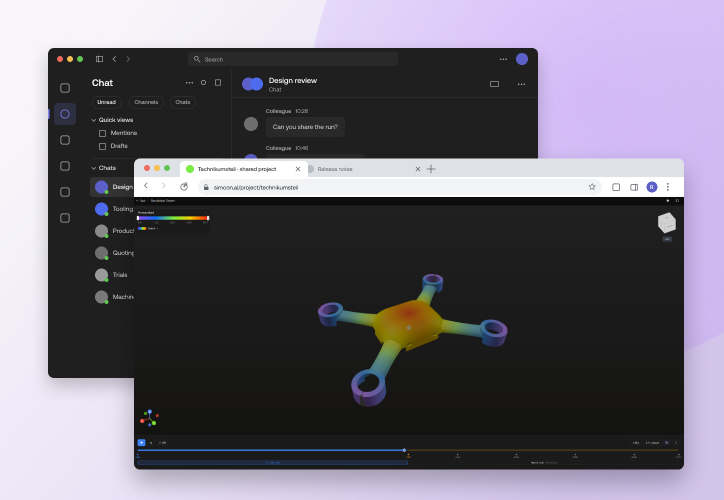
One subscription covers the agent and a browser view of the same project. A colleague can open the runs and the results without using AI, and see how the recommendation was reached. Everyone on the subscription sees the same project and the same results, live.

Team chat and browser view of the same simulation project

For the person who has to approve it

What you are actually authorizing

This is one subscription, one team, and one new habit. The measurable change is time. A gate question that used to wait for an afternoon of setup gets answered while the meeting is still running, and a sweep that would have taken two weeks of somebody's calendar finished in 86 minutes in our own run.

  1. You see it work first

    The first example runs offline on a laptop, without an account or a licence, so your engineer can show you a result before you approve anything.

  2. One subscription, up to three people

    Monthly, cancel any time. Colleagues join inside the same subscription at no extra cost, so the team can grow before it meets any commercial boundary.

  3. Your existing engineers do the work

    The same engineers answer more questions in the same week. The work that used to queue behind one simulation expert stops queuing.

  4. Decisions arrive with their evidence

    Every recommendation carries the runs behind it, which is what makes it defensible to a customer, an auditor or a tool shop.

Get started

See it work first. Decide after

Your first example runs before you sign up for anything. When you want your own parts in it, one subscription covers three people, and you can start today.

Create an account
  1. Sign up Takes a minute. Nothing to pay yet
  2. See what it does Worked examples and the full documentation, inside the portal, so you can judge it before you spend anything.
  3. Try it on your own parts € 1,599 a month for three people.

Frequently asked questions

I have never used any of this. Am I too far behind?

No. Three of the four teams that joined first arrived without using AI tooling at all, and one had a tool sitting in the building that nobody had tried. That is the normal starting point, not the exception, and it is why this page exists at all. The whole technology is a few months old, so nobody is years ahead of you.

Still have questions?
We're happy to help. Reach out to our Product team directly and we'll get back to you.